
一般ユーザーのパスワードなら、Web画面に管理者でログインすることで変更することができますが、管理者のパスワードを忘れて青くなったことはありませんか?
Nextcloud ユーザーのパスワード再設定方法
この操作は、NextcloudをインストールしたOSのコンソール上で行いますので、シェルにログインできることが前提です。操作には occ (ownCloud Console) というコマンドを使用します。
Nextcloud サーバーのシェルにアクセスする
私の環境では、TrueNAS CORE 上の Nextcloud アプリがJailで動作しています。同じ環境ならば、Jailから直接シェルにアクセスできるので便利です。
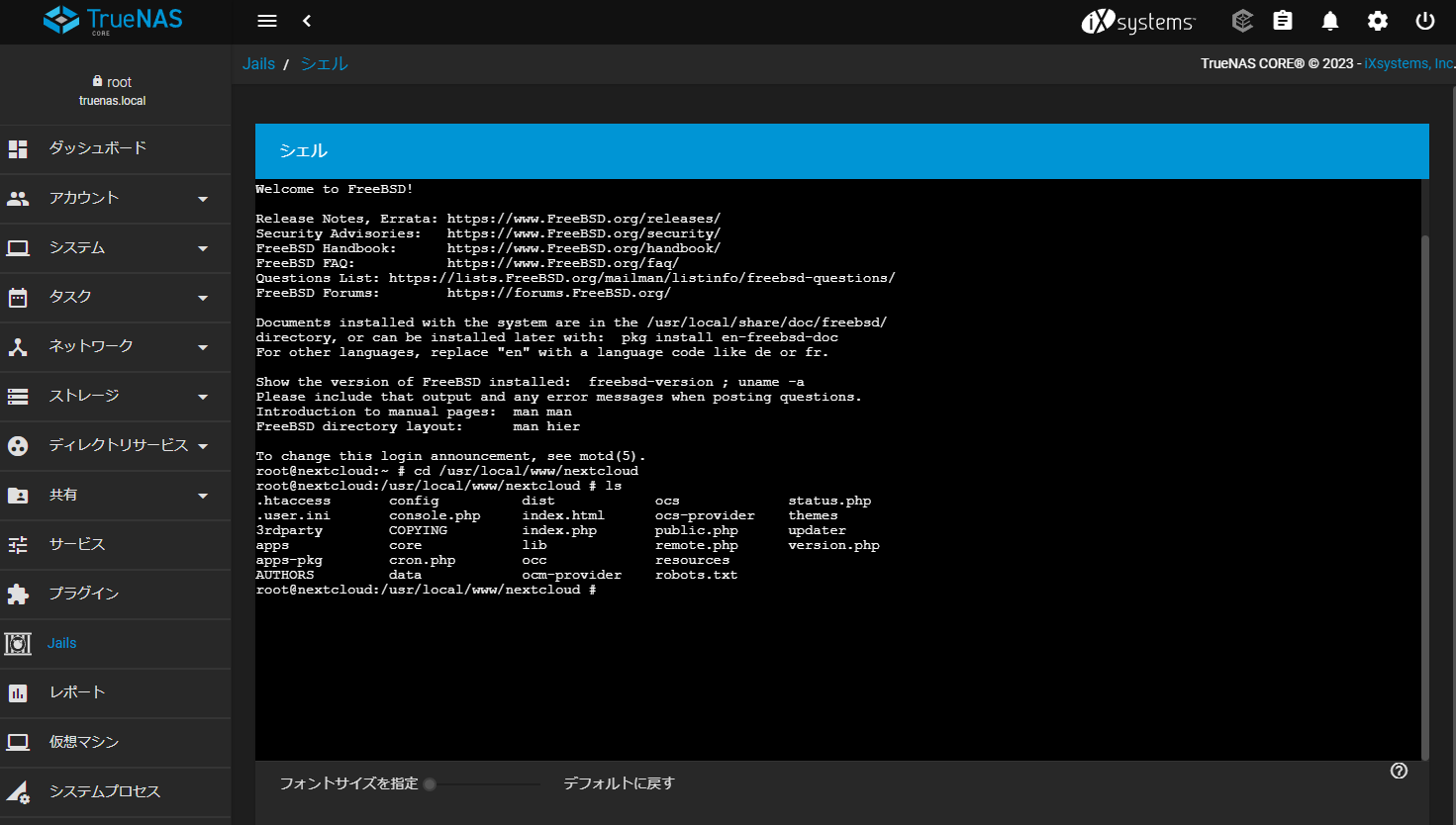
Nextcloud のインストールディレクトリに移動する
この環境での Nextcloud のインストール Path は、 /usr/local/www/nextcloud です。
cd /usr/local/www/nextcloudここに、occ コマンドのファイルが見つかるはずです。
パスワード再設定コマンドを発行する
ここでの管理者名は [ admin ] です。もちろん、一般ユーザーのパスワード再設定も行えますよ。
root@nextcloud:/usr/local/www/nextcloud # occ user:resetpassword admin
Enter a new password:
Confirm the new password:
Successfully reset password for admin
これだけで完了です。以前と同じパスワードを指定しても怒られません。ユーザーテーブルの reloard なども不要です。ログインしてみてください。
occ コマンドは便利
occ パスワード再設定の他、管理者向けにさまざまな機能を提供してくれます。ステータスをチェックしたり、システムのアップデートなども行うことができます。参考までにコマンド一覧を以下に掲載しておきますね。
root@nextcloud:/usr/local/www/nextcloud # occ list
Nextcloud is in maintenance mode, hence the database isn't accessible.
Cannot perform any command except 'maintenance:mode --off'

Nextcloud 25.0.2

Usage:
  command [options] [arguments]

Options:
  -h, --help            Display this help message
  -q, --quiet           Do not output any message
  -V, --version         Display this application version
      --ansi            Force ANSI output
      --no-ansi         Disable ANSI output
  -n, --no-interaction  Do not ask any interactive question
      --no-warnings     Skip global warnings, show command output only
  -v|vv|vvv, --verbose  Increase the verbosity of messages: 1 for normal output, 2 for more verbose output and 3 for debug

Available commands:
  check                                  check dependencies of the server environment
  help                                   Display help for a command
  list                                   List commands
  status                                 show some status information
  upgrade                                run upgrade routines after installation of a new release. The release has to be installed before.
 app
  app:disable                            disable an app
  app:enable                             enable an app
  app:getpath                            Get an absolute path to the app directory
  app:install                            install an app
  app:list                               List all available apps
  app:remove                             remove an app
  app:update                             update an app or all apps
 background
  background:ajax                        Use ajax to run background jobs
  background:cron                        Use cron to run background jobs
  background:webcron                     Use webcron to run background jobs
 background-job
  background-job:execute                 Execute a single background job manually
  background-job:list                    List background jobs
 broadcast
  broadcast:test                         test the SSE broadcaster
 config
  config:app:delete                      Delete an app config value
  config:app:get                         Get an app config value
  config:app:set                         Set an app config value
  config:import                          Import a list of configs
  config:list                            List all configs
  config:system:delete                   Delete a system config value
  config:system:get                      Get a system config value
  config:system:set                      Set a system config value
 db
  db:add-missing-columns                 Add missing optional columns to the database tables
  db:add-missing-indices                 Add missing indices to the database tables
  db:add-missing-primary-keys            Add missing primary keys to the database tables
  db:convert-filecache-bigint            Convert the ID columns of the filecache to BigInt
  db:convert-mysql-charset               Convert charset of MySQL/MariaDB to use utf8mb4
  db:convert-type                        Convert the Nextcloud database to the newly configured one
 encryption
  encryption:change-key-storage-root     Change key storage root
  encryption:decrypt-all                 Disable server-side encryption and decrypt all files
  encryption:disable                     Disable encryption
  encryption:enable                      Enable encryption
  encryption:encrypt-all                 Encrypt all files for all users
  encryption:list-modules                List all available encryption modules
  encryption:migrate-key-storage-format  Migrate the format of the keystorage to a newer format
  encryption:set-default-module          Set the encryption default module
  encryption:show-key-storage-root       Show current key storage root
  encryption:status                      Lists the current status of encryption
 group
  group:add                              Add a group
  group:adduser                          add a user to a group
  group:delete                           Remove a group
  group:info                             Show information about a group
  group:list                             list configured groups
  group:removeuser                       remove a user from a group
 integrity
  integrity:check-app                    Check integrity of an app using a signature.
  integrity:check-core                   Check integrity of core code using a signature.
  integrity:sign-app                     Signs an app using a private key.
  integrity:sign-core                    Sign core using a private key.
 l10n
  l10n:createjs                          Create javascript translation files for a given app
 log
  log:file                               manipulate logging backend
  log:manage                             manage logging configuration
 maintenance
  maintenance:data-fingerprint           update the systems data-fingerprint after a backup is restored
  maintenance:mimetype:update-db         Update database mimetypes and update filecache
  maintenance:mimetype:update-js         Update mimetypelist.js
  maintenance:mode                       set maintenance mode
  maintenance:repair                     repair this installation
  maintenance:repair-share-owner         repair invalid share-owner entries in the database
  maintenance:theme:update               Apply custom theme changes
  maintenance:update:htaccess            Updates the .htaccess file
 preview
  preview:repair                         distributes the existing previews intosubfolders
  preview:reset-rendered-texts           Deletes all generated avatars and previews of text and md files
 security
  security:bruteforce:reset              resets bruteforce attemps for given IPaddress
  security:certificates                  list trusted certificates
  security:certificates:import           import trusted certificate in PEM format
  security:certificates:remove           remove trusted certificate
 tag
  tag:add                                Add new tag
  tag:delete                             delete a tag
  tag:edit                               edit tag attributes
  tag:list                               list tags
 twofactorauth
  twofactorauth:cleanup                  Clean up the two-factor user-provider association of an uninstalled/removed provider
  twofactorauth:disable                  Disable two-factor authentication for a user
  twofactorauth:enable                   Enable two-factor authentication for auser
  twofactorauth:enforce                  Enabled/disable enforced two-factor authentication
  twofactorauth:state                    Get the two-factor authentication (2FA) state of a user
 user
  user:add                               adds a user
  user:add-app-password                  Add app password for the named user
  user:delete                            deletes the specified user
  user:disable                           disables the specified user
  user:enable                            enables the specified user
  user:info                              show user info
- occ は php スクリプトです。http に権限を持つユーザーで実行してください。
ex.)
sudo -u www-data php occ
occ コマンドは機能が多すぎますので、個別にご紹介する機会があるかもしれません。